From the workbench
Rouge Syntax Highlighter Preview
rouge themes syntax-highlighter
Project overview
While choosing syntax highlighting for my blog, I wanted to compare Rouge themes on actual sample code. This small preview application makes that choice visible: pick a theme and see how it changes the highlighted examples.
The original implementation combines Ruby's Rouge highlighter, a shell generation script, Jekyll templates and a small amount of JavaScript. Theme assets are generated ahead of time; selecting a theme changes the stylesheet used by the page.
Generate once, compare in the browser
The script generateThemeYaml.sh performs two jobs: collect the available Rouge theme names into _data/themes.yaml, and generate a stylesheet for each theme under css/. Each CSS filename follows the pattern syntax-<theme-name>.css.
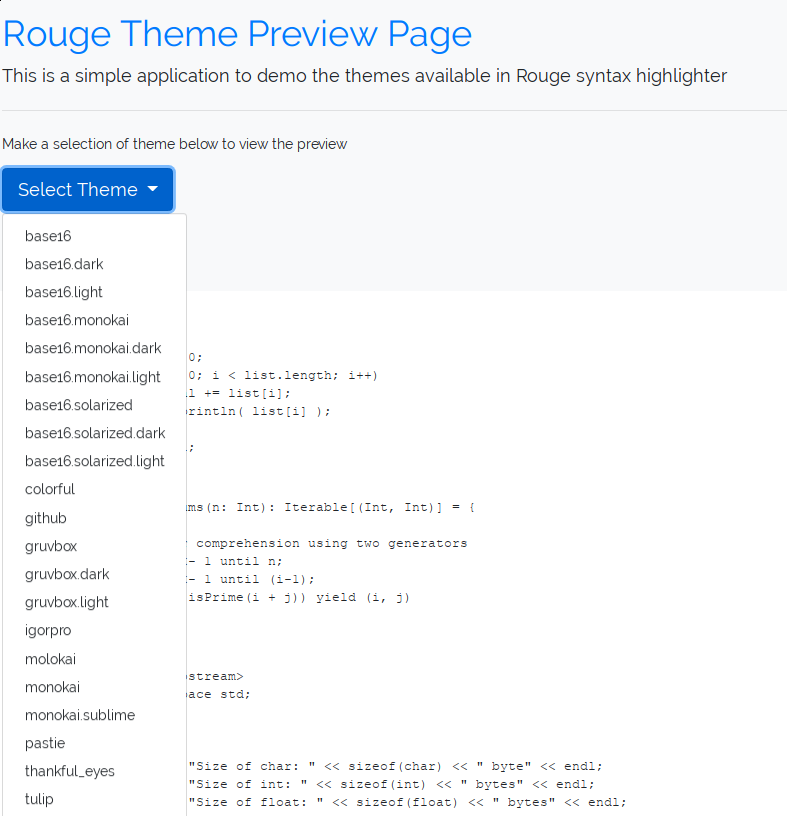
A Liquid loop uses the YAML list to build the theme selector. In the original browser code, choosing a theme removes the active syntax stylesheet and appends a link to the newly selected one. The sample code remains in place, making differences in colour and contrast easier to compare.
A small tool for a specific decision
- Compare themes against the same highlighted code examples.
- Generate the selector and styles from the themes available to the build.
- Keep the interaction static-site friendly: no application server is needed for switching stylesheets.
How a theme reaches the preview
Building the page
Rouge themes
The theme names available to the build.
Shell generation
Write a YAML list and one CSS file per theme.
Jekyll and Liquid
Build the selector from that list.
Choosing a theme
Select a name
Choose a theme from the dropdown.
Replace stylesheet
Remove the old syntax CSS and link the selected file.
Compare the code
Inspect the same examples in the new theme.
From the original project
Historical screenshots from the project articles. Open an image to view it at full size.
Project notes
The original article located the application code on the gh-pages branch and listed custom background selection as a future idea. Those are historical notes, not a claim about the current theme inventory or feature set.